Rojgar Sangam UP — Registration, Login, Vacancy & Overseas Jobs
Rojgar Sangam उत्तर प्रदेश सरकार का official employment portal है, जिसे Directorate of Training & Employment, Rojgaar Bhawan, Lucknow से चलाया जाता है। यह पोर्टल rojgaarsangam.up.gov.in पर होस्ट किया गया है और job seekers को private jobs, government recruitments, Rojgaar Mela, Apprenticeship, Campus Placement और Overseas Jobs के लिए free registration देता है।
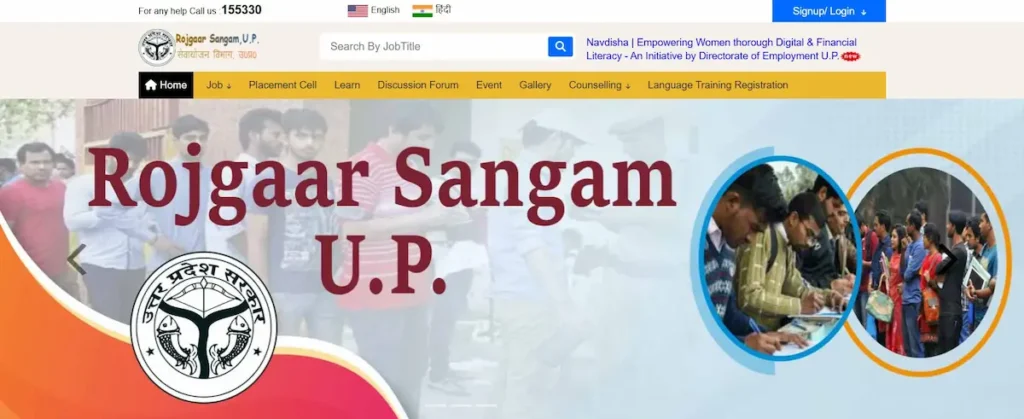
यह पेज उन सभी लोगों के लिए है जो अपनी first government portal registration कर रहे हैं — fresh graduates, ITI-pass और Diploma holders, 10th और 12th pass candidates, Pink Jobs के ज़रिए apply करने वाली महिलाएं, और वो skilled workers जो NSDC के verified channel से overseas job ढूंढ रहे हैं। यहां हर step official portal और Job Seeker User Manual से cross-check करके लिखा गया है।
Rojgar Sangam क्या है? — एक साफ़ तस्वीर
Rojgar Sangam एक integrated employment portal है जो private sector jobs, Campus Placement, Rojgaar Mela, Apprenticeship और skilled-labour placement — सबको एक ही platform पर लाता है। यह सिर्फ UP residents के लिए बनाया गया है।
पोर्टल को UP का Department of Labor & Employment चलाता है। मौजूदा समय में Cabinet Minister हैं श्री अनिल राजभर और Director (Employment) हैं श्रीमती नेहा प्रकाश, IAS।
आज के latest portal data के हिसाब से:
- 44.97 लाख+ registered job seekers
- 6,000+ registered employers
- 6.9 लाख+ jobs awarded
Source: official homepage stats panel — rojgaarsangam.up.gov.in.
यह एक सरकारी job portal है — कोई योजना या scheme नहीं। यहां से job apply करना, profile बनाना, और mela registration करना — सब कुछ free है।
Rojgar Sangam vs Sewayojan vs Rojgaar Mela — इन तीनों में क्या अंतर है?
लोगों को इन तीनों नाम में सबसे ज़्यादा confusion होता है। साफ़ अंतर यह है:
| Term | क्या है | URL / Access |
|---|---|---|
| Sewayojan | UP Employment Department का पुराना portal नाम। Legacy URL आज भी use होता है। | sewayojan.up.nic.in (कई cases में नए system पर redirect हो जाता है) |
| Rojgar Sangam | मौजूदा official integrated employment portal — Sewayojan का updated successor system | rojgaarsangam.up.gov.in |
| Rojgaar Mela | एक offline + online recruitment event जो Rojgar Sangam portal के अंदर hosted है | Rojgar Sangam portal के “Job → Active Rojgaar Mela” menu से access होता है |
जो लोग “Sewayojan” type करते हैं, वो अक्सर Rojgar Sangam ही ढूंढ रहे होते हैं। Platform नए portal पर consolidate हो चुका है, लेकिन पुराना Sewayojan brand नाम आज भी रोज़मर्रा की बातचीत, news headlines, और पुराने posters पर दिखता है।
Rojgar Sangam Registration — Step-by-Step (Official User Manual के आधार पर)
- Step 1 — पोर्टल Open करें अपने browser (Chrome, Firefox, या Edge) में rojgaarsangam.up.gov.in open करें। ऊपर Hindi / English language toggle मिलता है
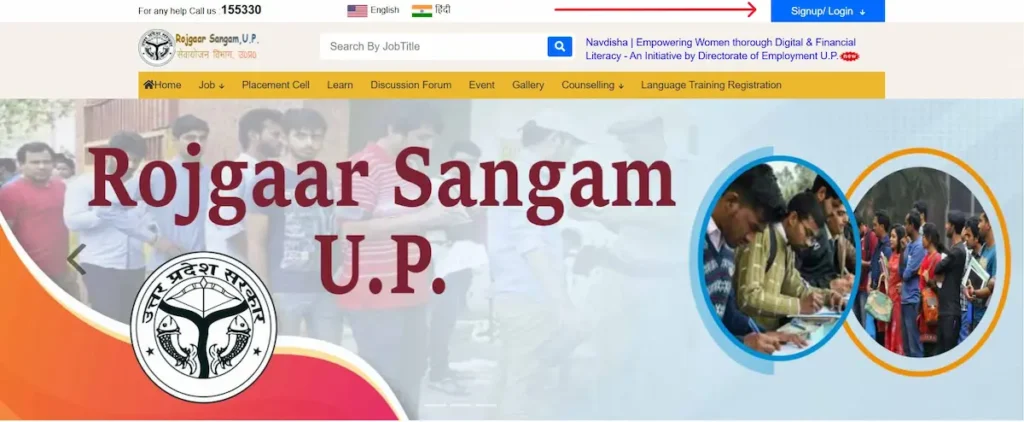
- Step 2 — Sign Up / Login Menu Top-right corner पर “Sign up/Login” पर click करें। Dropdown में से “Job Seeker” select करें। on top menu click Sign upLogin select Job Seeker in dropdown
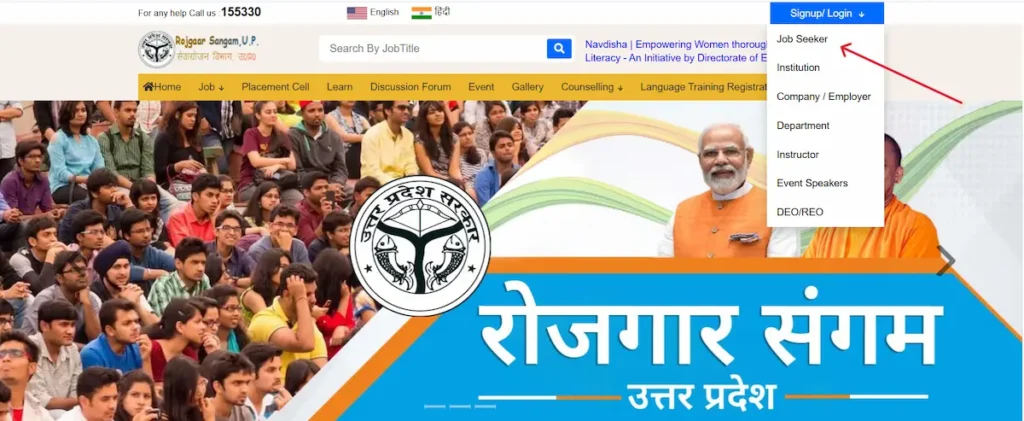
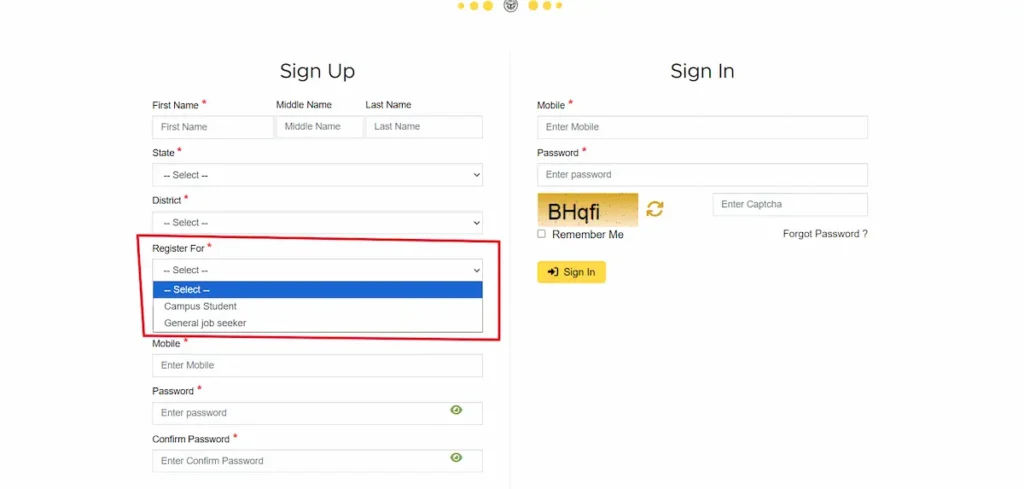
- Step 3 — Registration Type चुनें Signup page पर दो options आते हैं:
- Campus Student — अगर आप अभी किसी college, institute या university के final year में हैं।
- General Job Seeker — अगर आप pass-out हो चुके हैं।
- choose Registration type
- Step 4 — Basic Details + OTP Verification अपना First name enter करें, state select करें, district select करें, mobile number enter करें, और strong password enter करें। “I accept Terms & Conditions” वाले option को tick करें, और captcha enter करें। और फिर नीचे “Sign Up” पर click करें। OTP आपके mobile और email — दोनों पर आएगा। उसे enter करके verify करें। enter all details
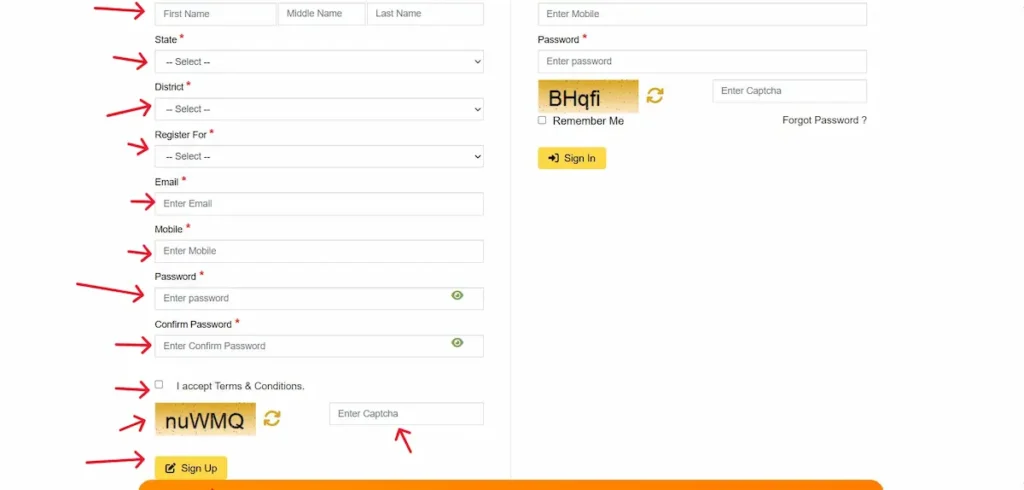
- Step 5 — Sign In करें वापस “Sign In” पर जाएं। Registered mobile number, बनाया हुआ password और captcha enter करें। आपके सामने Jobseeker Resume page खुलेगा।
- Step 6 — Profile Complete करें (8 Sections) Resume page पर ये 8 sections एक-एक करके भरें। हर section के बाद Save ज़रूर करें:
- Personal Details — gender, DOB, marital status, माता-पिता का नाम
- Permanent Address
- Physical Details
- Career Profile
- Educational Qualification — “New Education” button पर click करें
- Experience — “New Experience” button पर click करें। Industry, role, CTC, employment type भरें
- Language
- Skills — “New Skills” button पर click करें
- Step 7 — Documents Upload करें “My Documents” button पर click करके सारे ज़रूरी certificates upload करें।
- Step 8 — Final Submission & Lock “Final Submission and Lock” पर click करें। Profile lock हो जाएगा।
- Step 9 — Registration Card Download करें “Print Registration Card” पर click करके अपना Job Card download करें। यही document पुराने Sewayojan system में Registration Certificate या X-10 Report के नाम से जाना जाता था।
Registration के लिए ज़रूरी Documents — Verified List
Mandatory:
- Active mobile number (OTP के लिए)
- Email ID (OTP के लिए)
- Aadhaar Card (identity के लिए)
- 10th class marksheet
- Passport-size photo (digital copy)
- Signature (digital copy)
Required when applicable:
- 12th class marksheet
- Graduation / PG certificate
- ITI / Diploma certificate
- Experience certificate (अगर prior work history है)
- Caste certificate (SC / ST / OBC — reservation claim करने पर)
- Income certificate (Berojgari Bhatta apply करने पर)
- Disability certificate (अगर applicable हो)
- Domicile / Residence certificate (UP residence proof के लिए)
Photo और signature की size और format requirements form के upload section पर live show होती हैं — वही instruction follow करें।
Rojgar Sangam Login — Job Seeker, Employer, और दूसरे Users के लिए
पोर्टल पर 7 अलग-अलग login options हैं। हर user type के लिए एक dedicated route है:
| User Type | Login URL |
|---|---|
| Job Seeker Login | rojgaarsangam.up.gov.in/JobSeekerLogin |
| Institution Login | rojgaarsangam.up.gov.in/InstitutionLogin |
| Company / Employer Registration | rojgaarsangam.up.gov.in/EmployerRegistration |
| Department Login | rojgaarsangam.up.gov.in/DepartmentLogin |
| Instructor Login | rojgaarsangam.up.gov.in/InstructorLogin |
| Event Speakers Login | rojgaarsangam.up.gov.in/EventSpeakerLogin |
| DEO / REO Login | rojgaarsangam.up.gov.in/Login |
आम users के लिए पहला option — Job Seeker Login — काम करता है। बाकी options सिर्फ institutions, employers, government department users, instructors, event speakers, और District / Regional Employment Officers के लिए हैं।
Password या User ID भूल गए? — Recovery Process
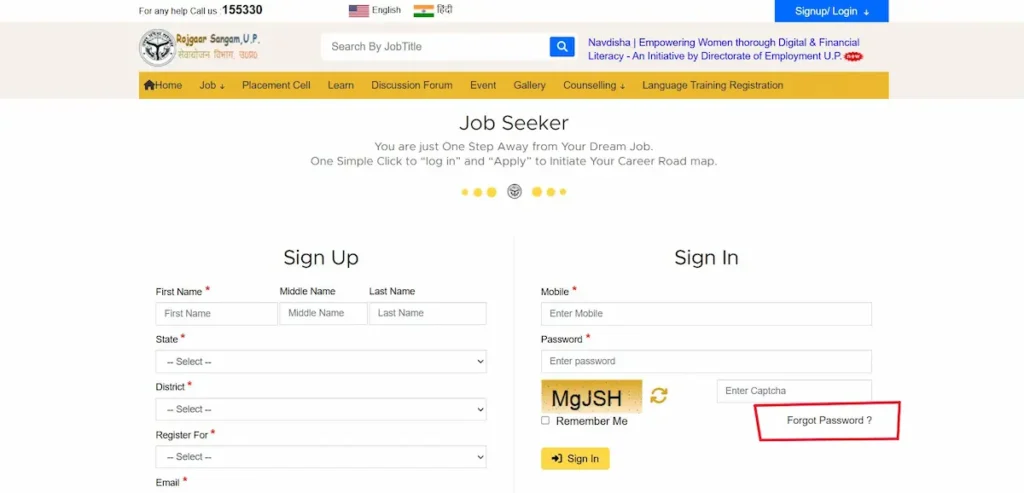
- Login page पर जाएं → rojgaarsangam.up.gov.in/JobSeekerLogin
- “Forgot Password” link पर click करें click Forgot Password
- Registered mobile number enter करें enter Registered mobile number
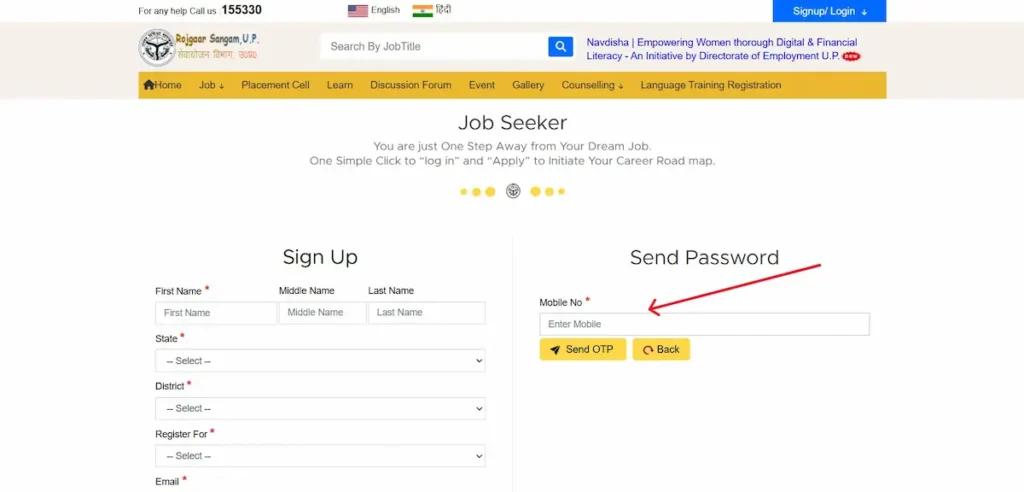
- OTP receive करें और verify करें
- नया password set करें (rules: minimum 8 characters, एक capital letter, एक number, एक special character)
OTP नहीं आ रहा तो सबसे पहले confirm करें कि आपका mobile number Aadhaar से linked है और DND mode off है। Helpline 155330 पर भी call कर सकते हैं।
Rojgar Sangam पर Job Search — सारी Job Categories एक जगह
पोर्टल के “Job” menu में 6 verified categories हैं:
- Private Jobs — पोर्टल पर registered employers की direct hiring listings. Apply: rojgaarsangam.up.gov.in/PrivateJobs
- Active Rojgaar Mela — UP के districts में चलने वाले और upcoming job fairs. Apply: rojgaarsangam.up.gov.in/RojgaarMela
- Campus Placement — सिर्फ उन job seekers के लिए जिन्होंने “Campus Student” type में register किया है. Page: rojgaarsangam.up.gov.in/CampusPlacementJobs
- Apprenticeship — मुख्य रूप से ITI / Diploma candidates के लिए apprentice openings. Page: rojgaarsangam.up.gov.in/Apprenticeship
- Pink Jobs — महिला job seekers के लिए dedicated section, UP Directorate of Employment की Navdisha initiative के under. Page: rojgaarsangam.up.gov.in/PinkJobs
- Overseas Jobs — UP Directorate of Employment के साथ partnership में NSDC International की verified foreign openings. Page: rojgaarsangam.up.gov.in/OverseasJobs. सिर्फ official portal से apply करें — कोई agent या middleman involved नहीं है।
पोर्टल homepage पर फ़िलहाल जो skill categories सबसे ज़्यादा active हैं: Health Care (74,000+), Data Entry Operator (28,000+), Teacher (14,000+), Carpenter (14,000+), Electrician (10,000+), Driver (9,000+), Fitter (9,000+), IT Sector (8,000+), Nursing (3,000+), Plumber (3,000+)।
NSDC Rojgar Sangam Overseas Jobs — Foreign Hiring Channel असल में कैसे काम करता है
Government of India अपने NSDC International Limited (National Skill Development Corporation की subsidiary) के through verified foreign job openings के लिए Indian workers को recruit करता है। UP के case में यह recruitment UP Directorate of Employment की partnership के साथ चलती है, और सारी applications उसी Rojgar Sangam portal के “Overseas Jobs” section के through होती हैं। Recruiting agents को अलग से Ministry of External Affairs verify करता है।
पिछली drives में जो categories अक्सर appear हुई हैं: construction trades (plastering, ceramic tiling, dry-wall fitting, masonry, carpentry), nursing और caregiving roles, और skilled manufacturing roles। हर drive अपनी eligibility, qualification और salary range अलग list करती है — exact salary figure तभी देखें जब current notification पर live published हो।
Apply करने का process:
- Rojgar Sangam पर login करें → Job → Overseas Jobs पर click करें
- Country, trade, education और experience के filters set करें
- अपनी registered profile से matching opening पर apply करें
- Selected candidates को English pre-screening test और NSDC International का Recognition of Prior Learning (RPL) test clear करना होता है
- Passport (कम-से-कम 3 साल valid) और trade-specific documents ज़रूरी हैं
⚠️ कोई भी overseas job सिर्फ Rojgar Sangam portal और NSDC International की official notifications के through apply करें — किसी agent या WhatsApp message से नहीं। NSDC International का official portal: nsdcinternational.com.
Rojgar Sangam Yojana — Berojgari Bhatta की सच्चाई
पहले एक confusion clear करना ज़रूरी है: Rojgar Sangam खुद कोई पैसा देने वाली scheme नहीं है। यह एक job portal है।
पोर्टल पर registration UP की Berojgari Bhatta (Unemployment Allowance) scheme के लिए pre-requisite है। यानी, Bhatta के लिए apply करने से पहले आपका portal पर registered होना ज़रूरी है। Berojgari Bhatta खुद अलग से UP government administer करती है और eligible unemployed youth को monthly allowance देती है।
Typical eligibility (announcement के साथ change हो सकती है):
- UP domicile
- Age: 21–35 years
- Minimum 12th-pass / graduate
- Currently unemployed
- Family income UP government की notified limit के अंदर
Exact amount और current application window UP Employment Department की official notifications में announce होती है।
Latest amount और application window के लिए Rojgar Sangam portal के “Latest News” section को check करें — rojgaarsangam.up.gov.in/home. यहां सारे official Government Orders (GO) PDF format में upload किए जाते हैं।
Active Rojgaar Mela — District-Wise और Divisional Job Fairs
Active Rojgaar Mela openings पोर्टल पर live update होते हैं। कोई भी registered Job Seeker अपने dashboard से directly mela के लिए apply कर सकता है।
Mela के main types:
- Weekly District-Level Mela — हर district में होने वाले routine fairs
- Mega Rojgaar Mela — divisional headquarters पर होने वाले बड़े fairs
- Apprentice Mela — ITI-pass candidates के लिए
- Special Drives — जैसे Pink Jobs Mela, जो specifically women candidates के लिए organize होते हैं
Mela में ले जाने वाले documents:
- Registration Card का printout
- Original ID proof (Aadhaar)
- Education certificates की photocopies
- 2 passport-size photographs
- Updated resume
Schedule हर हफ़्ते change होता है, इसलिए fake “May–June” जैसी list पर भरोसा न करें। Live list यहां check करें:
View All Active Rojgaar Mela → rojgaarsangam.up.gov.in/RojgaarMela
Rojgar Sangam Mobile App — Verified Downloads
पोर्टल के official mobile app के सिर्फ दो verified download links हैं:
- Google Play Store → play.google.com/store/apps/details?id=com.threesixzero.rojgaarsangam
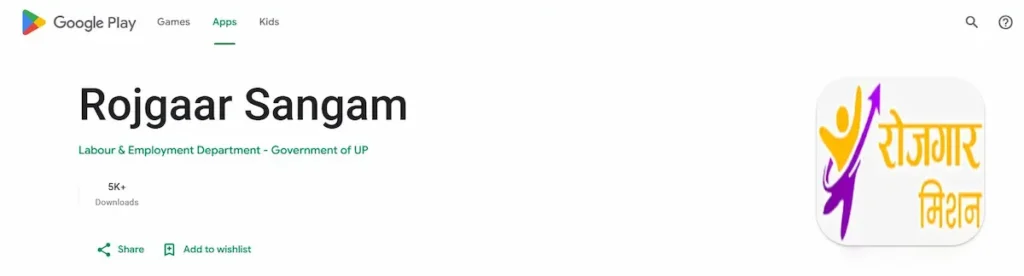
- Apple App Store → apps.apple.com/in/app/rojgaar-sangam/id6761318924
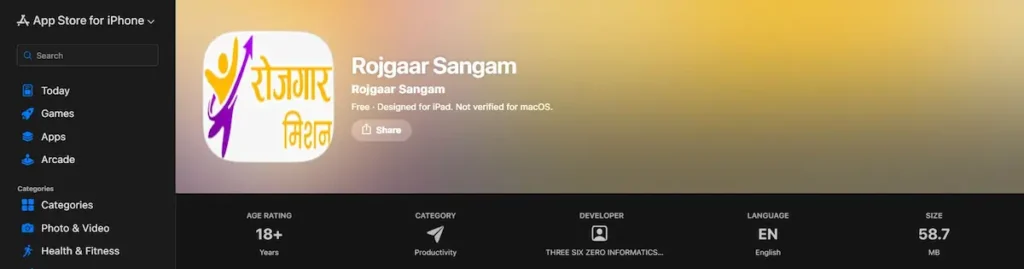
App से आप registration, job search, mela apply और profile update — सब कुछ mobile पर कर सकते हैं। App login उसी registered mobile number और password से होता है जो portal के लिए use किया जाता है।
⚠️ किसी भी “Rojgar Sangam” app को third-party APK sites से download न करें। सिर्फ ऊपर दिए गए Play Store और App Store links ही official हैं।
Counselling और Career Support — वो Free Services जो ज़्यादातर Users Miss कर देते हैं
पोर्टल पर 3 free counselling services हैं जिनकी तरफ़ लोग ध्यान नहीं देते:
- One-to-One Career Counselling → rojgaarsangam.up.gov.in/careercounselling
- Psychometric Counselling → rojgaarsangam.up.gov.in/PsychometricCounselling
- Professional Mentoring → rojgaarsangam.up.gov.in/professionalmentoring
ये तीनों services पोर्टल के “Counselling” menu में available हैं। Online appointments book कर सकते हैं। ख़ासकर fresh graduates और first-time job seekers के लिए ये recommend किए जाते हैं।
इसके अलावा, Language Training Registration (rojgaarsangam.up.gov.in/JobSeekerlanguageTraining.aspx) उन candidates के लिए useful है जो overseas placement की तैयारी कर रहे हैं।
सबसे Common Problems जो Real Users Face करते हैं — और उनके Solution
- OTP नहीं आ रहा Mobile DND status check करें, Aadhaar–mobile linking confirm करें, 2 मिनट wait करके resend करें, या mobile data से Wi-Fi पर switch करें।
- Photo / signature upload fail हो रहा है Upload prompt पर जो size और format show हो रही है, उसी को follow करें। Photo JPG format में save करें। Browser change करके try करें अगर upload hang हो।
- Profile lock के बाद edit नहीं हो रहा Final Submission and Lock के बाद edit के लिए dashboard से profile unlock करना पड़ता है। यह option desktop view में clear दिखता है।
- “Aadhaar already registered” error Duplicate account न बनाएं। “Forgot User ID” option use करें registered mobile / email के साथ।
- Job apply करते समय portal hang Peak hours (10 AM – 12 PM) avoid करें। Browser cache clear करें, या mobile app से try करें।
- Registration Card download नहीं हो रहा अपने browser में portal के लिए popups allow करें। Mobile पर fail हो रहा है तो desktop browser से try करें।
Rojgar Sangam Helpline, Contact & Official Address
- Helpline (Toll-free): 155330
- Option 1 — Sewa Mitra
- Option 2 — Rojgar Sangam
- Email IDs: rojgaarsangam.up@gmail.com | sewayojan-up@gov.in
- Office: Directorate of Training & Employment UP, Rojgaar Bhawan, Guru Govind Singh Marg, Lucknow – 226001
- Complaint / Suggestion form: rojgaarsangam.up.gov.in/complain
Sewayojan / Rojgar Sangam Doosre Rajya Mein — Quick State Reference
| State | Portal | Official URL |
|---|---|---|
| Uttar Pradesh | Rojgar Sangam (Sewayojan) | rojgaarsangam.up.gov.in |
| Madhya Pradesh | MP Rojgar Panjiyan | mprojgar.gov.in |
| Bihar | NCS Bihar | ncs.gov.in |
| Rajasthan | Rajasthan SSO Rojgar | sso.rajasthan.gov.in |
| Haryana | Haryana Kaushal Rozgar Nigam | hkrnl.itiharyana.gov.in |
| West Bengal | Employment Bank WB | employmentbankwb.gov.in |
Rojgar Sangam सिर्फ UP residents के लिए है। दूसरे state के candidates अपने state का portal use करें। NCS (National Career Service) — ncs.gov.in — एक central portal है जहां सारे state के job seekers register कर सकते हैं।
Rojgar Sangam पर Fraud से बचने के Real Tips
पोर्टल अपने homepage पर भी fraud warning popup दिखाता है। एक बार ये 5 points याद रखें:
- Rojgar Sangam registration completely free है। कोई fee मांगने वाला — registration के नाम पर, joining के नाम पर, या certificate के नाम पर — fraud है।
- Communication सिर्फ registered email और SMS पर आता है। Selected candidates को portal कभी WhatsApp या personal call से contact नहीं करता।
- Overseas jobs सिर्फ “Overseas Jobs” menu के through apply होते हैं। बीच में कोई agent, consultancy या middleman नहीं होता।
- “100% selection guarantee” या “salary fixed” promise करने वाले messages हमेशा fake होते हैं। Government portal ऐसा कुछ promise नहीं करता।
- Doubt हो तो सीधा helpline 155330 (option 2) पर call करें, या complaint file करें: rojgaarsangam.up.gov.in/complain.
FAQs
क्या Rojgar Sangam registration free है?
हां, completely free. कोई registration fee, processing fee या joining fee पोर्टल पर नहीं लगती। अगर कोई पैसा मांगे तो सीधा fraud है।
क्या Rojgar Sangam और Sewayojan एक ही हैं?
Practically हां। Sewayojan UP Employment Department का पुराना portal नाम था। उसका updated, integrated successor system आज Rojgar Sangam है, जो rojgaarsangam.up.gov.in पर hosted है।
क्या दूसरे state के candidate apply कर सकते हैं?
Rojgar Sangam मुख्य रूप से UP residents के लिए है। दूसरे state के candidates अपने state का portal या central platform ncs.gov.in use करें। Overseas Jobs section की कुछ openings सभी Indian citizens के लिए open हो सकती हैं।
Registration validity कितनी है?
Profile तब तक active रहती है जब तक आप regularly login करें और profile updated रखें। लंबे समय तक inactive रहने पर employer matching में आपकी visibility कम हो जाती है।
Overseas jobs apply करने के लिए agent चाहिए?
बिल्कुल नहीं। सिर्फ पोर्टल के “Overseas Jobs” section से apply करें। Agent या WhatsApp message के through आने वाला कोई भी offer fraud category में आता है।
इस rojgarsangam.org Information Platform के बारे में
यह एक independent information portal है। हम Government of Uttar Pradesh से affiliated नहीं हैं। हमारा काम सिर्फ यह है कि users को official portal की सही, verified जानकारी एक जगह दे सकें।
सारी registration, application, और benefit processes सिर्फ official portal rojgaarsangam.up.gov.in पर complete करें।